In my current project I encountered a usability issue. The users where unable to see where the cursor was located. It was flickering, but on a page with ,multiple input components it was very difficult to locate the field where the cursor was located. I decided to help them out and that proofed to be both very simple and in the end very helpful. I used skinning to give the active field a colored background.

First I defined a skin in my trinidad-config.xml
Next I made sure that the application uses the skin by defining it in the trinidad-config.xml
Finally I created the corresponding style sheet and added entries for focus pseudoclass.
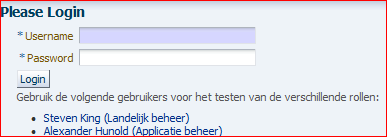
The result is highlighted fields whenever the cursor is in it.
For an LOV field:

For a date field:

For an inputtext field:

Imagine the effect on a page with several dozens of inpt fields....
First I defined a skin in my trinidad-config.xml
 <?xml version="1.0" encoding="windows-1252" ?>
 <skins xmlns="http://myfaces.apache.org/trinidad/skin">
  <skin>
  <id>custom.desktop</id>
  <family>custom</family>
  <extends>fusion.desktop</extends>
  <render-kit-id>org.apache.myfaces.trinidad.desktop</render-kit-id>
  <style-sheet-name>skin/custom.css</style-sheet-name>
  </skin>
  </skins>
Next I made sure that the application uses the skin by defining it in the trinidad-config.xml
 <?xml version="1.0" encoding="windows-1252"?>
   <trinidad-config xmlns="http://myfaces.apache.org/trinidad/config">
    <skin-family>custom</skin-family>
   </trinidad-config>
Finally I created the corresponding style sheet and added entries for focus pseudoclass.
   af|inputText::content:focus {background-color:rgb(214,214,255);}
   af|inputDate::content:focus {background-color:rgb(214,214,255);}
   af|inputListOfValues::content:focus {background-color:rgb(214,214,255);}
The result is highlighted fields whenever the cursor is in it.
For an LOV field:

For a date field:

For an inputtext field:

Imagine the effect on a page with several dozens of inpt fields....
Comments