A couple of days ago some one asked me if it was possible to bind inline style properties to a backing bean using Expression Language. I knew this was possible so I explained him how to do that. This also was a nice opportunity to try out how an af:inputNumberSlider works. I wanted to use the value of the slider to set the fontsize in the rest of my example application.
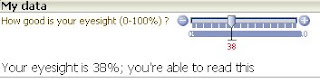
It worked ! Here's how I did it.
First you have to drop the af:inputNumberSlider on your page. You also have to drop an af:outputText on your page. This textfield will contain the displayed text. If you want the page to use the value of the slider immediately, you have to set the autosubmit property of the slider to true. After that, give the slider an id and use this id in the partial triggers property of the inputtext.
Finally you have to bind the slider and the outputtext to a backingbean. In this bean you will read the slidervalue and use it to set the size of the text in the outputtext.
The source of the bean looks like this
public class UseSliderValues
{
private Integer sliderValue = 100;
private Integer sliderStartValue =100;
String text = "initial text";
String fontsize = "font-size:0%;";
public UseSliderValues() { }
public void setSliderStartValue(Integer sliderStartValue) {
this.sliderStartValue = sliderStartValue; }
public Integer getSliderStartValue() { return sliderStartValue; }
public Integer getSliderValue() { return sliderValue; }
public void valueChanged(ValueChangeEvent valueChangeEvent) {
this.sliderValue = (Integer)valueChangeEvent.getNewValue(); }
public String getFontsize() {
fontsize="font-size:"+(200-2*sliderValue)+"%;";
return fontsize; }
public String getText() {
if (sliderValue!=0) {
text="Your eyesight is "+sliderValue+ "%; you're able to read this"; }
else {
text="Are you sure ? With "+ sliderValue+"% eyesight you shouldn't be able to read anything except braille !!"; }
return text; }}
The source of the page will look something like this:
af:inputNumberSlider id="slider"
label="How good is your eyesight (0-100%) ?"
autoSubmit="true"
minimum="0" maximum="100"
value="#{RichComponents_backingbean.sliderStartValue}"
valueChangeListener="#{RichComponents_backingbean.valueChanged}"/>
af:outputText value="#{RichComponents_backingbean.text}"
partialTriggers="slider"
inlineStyle="#{RichComponents_backingbean.fontsize}"/>
Run the application and try some slider values (0% eyesight...........)

So now you have two solutions in one post: How to use a inputnumberslider and how to set the inlinestyle property through EL. I had fun doing this.

It worked ! Here's how I did it.
First you have to drop the af:inputNumberSlider on your page. You also have to drop an af:outputText on your page. This textfield will contain the displayed text. If you want the page to use the value of the slider immediately, you have to set the autosubmit property of the slider to true. After that, give the slider an id and use this id in the partial triggers property of the inputtext.
Finally you have to bind the slider and the outputtext to a backingbean. In this bean you will read the slidervalue and use it to set the size of the text in the outputtext.
The source of the bean looks like this
public class UseSliderValues
{
private Integer sliderValue = 100;
private Integer sliderStartValue =100;
String text = "initial text";
String fontsize = "font-size:0%;";
public UseSliderValues() { }
public void setSliderStartValue(Integer sliderStartValue) {
this.sliderStartValue = sliderStartValue; }
public Integer getSliderStartValue() { return sliderStartValue; }
public Integer getSliderValue() { return sliderValue; }
public void valueChanged(ValueChangeEvent valueChangeEvent) {
this.sliderValue = (Integer)valueChangeEvent.getNewValue(); }
public String getFontsize() {
fontsize="font-size:"+(200-2*sliderValue)+"%;";
return fontsize; }
public String getText() {
if (sliderValue!=0) {
text="Your eyesight is "+sliderValue+ "%; you're able to read this"; }
else {
text="Are you sure ? With "+ sliderValue+"% eyesight you shouldn't be able to read anything except braille !!"; }
return text; }}
The source of the page will look something like this:
af:inputNumberSlider id="slider"
label="How good is your eyesight (0-100%) ?"
autoSubmit="true"
minimum="0" maximum="100"
value="#{RichComponents_backingbean.sliderStartValue}"
valueChangeListener="#{RichComponents_backingbean.valueChanged}"/>
af:outputText value="#{RichComponents_backingbean.text}"
partialTriggers="slider"
inlineStyle="#{RichComponents_backingbean.fontsize}"/>
Run the application and try some slider values (0% eyesight...........)

So now you have two solutions in one post: How to use a inputnumberslider and how to set the inlinestyle property through EL. I had fun doing this.
Comments